Introduction
If you have the need to use your own Identity Provider, and want to go with something light (
i.e.: not ADFS), Thinktecture’s Identity Server is your product. I have been using it for the last couple of months and I love it!! I actually added a service layer over it to enable my RP to provision users in the Identity Server (yes, I know that this is contrary to the general concept of outsourcing Identity Management, but in my scenario, trust me, it makes sense).
From the
CodePlex site:
Thinktecture IdentityServer is an open source security token service based on Microsoft .NET, ASP.NET MVC, WCF and WIF.
High level features
- Multiple protocols support (WS-Trust, WS-Federation, OAuth2, WRAP, JSNotify, HTTP GET)
- Multiple token support (SAML 1.1/2.0, SWT)
- Out of the box integration with ASP.NET membership, roles and profile
- Support for username/password and client certificates authentication
- Support for WS-Federation metadata
- Support for WS-Trust identity delegation
- Extensibility points to customize configuration and user management handling
Setup
UPDATE: This walk-through assumes you are setting up Identity Server in a production/QA environment, and not as a single machine/developer setup. Hence why we are setting up by using SQL Server instead of mounting the Compact database included in the App_Data directory, as well as installing the ASP.NET Membership provider DB on the DB Server.
Download
source from
here
Unzip the file and open the solution.
Because Identity Server (IdSvr) needs an ASP.NET membership database, we are going to set one up (if it doesn’t exist). There are some great tutorials on the web on how to do this (if you don’t already know),
here is one of them.
After having installed the
ASP.NET Membership database, we are going to update the connection string in IdSvr to point to said database.
The connection string file is located at \Configuration\connectionstring.config (Below is an example)
1: <connectionStrings>
2: <add name="ProviderDB"
3: connectionString="Persist Security Info=False;
4: User ID=sa;
5: password=****;
6: Initial Catalog=aspnetdb;
7: Data Source=mydbserver;"
8: providerName="System.Data.SqlClient" />
9:
>
To test that the connection string works, in
Solution Explorer, you should select the
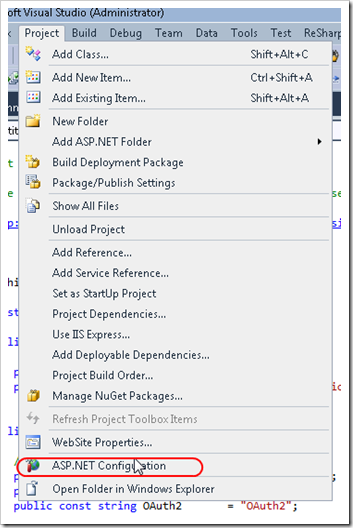
Website project, then from Visual Studio’s menu, select Project –> ASP.NET Configuration. This will launch the ASP.NET Web Site Administration Tool.

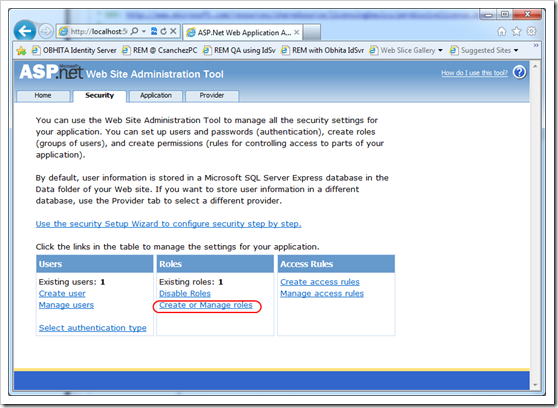
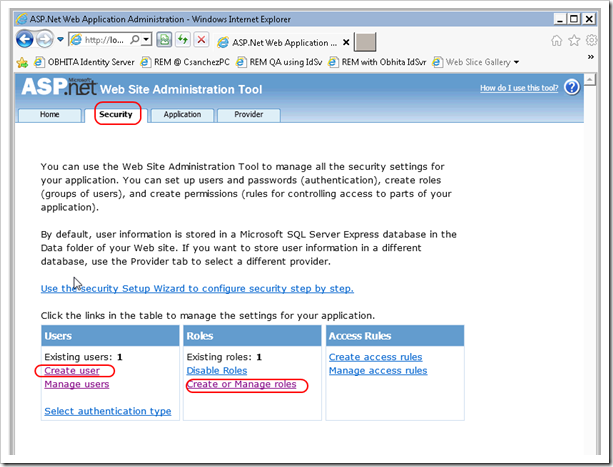
Using the ASP.NET Web Site Administration Tool, proceed to create a user (i.e.:
Administrator) and a roles called
IdentityServerAdministrators and IdentityServerUsers. These roles are important because they allow the user created to logon to IdSvr’s administration screen, and in the case of
IdentityServerUsers, to be forwarded to the RPs upon successful login. These roles are specified in the
Constants.cs file inside of the
Thinktecture.IdentityServer.Core project.
1: public static class Constants
2: {
3: // ....
4: public static class Roles
5: {
6: public const string InternalRolesPrefix = "IdentityServer";
7: public const string Users = "Users";
8: public const string Administrators = "Administrators";
9:
10: public const string IdentityServerUsers = InternalRolesPrefix + Users;
11: public const string IdentityServerAdministrators = InternalRolesPrefix + Administrators;
12: }


Configuring IIS 7
Let’s proceed to configure IIS 7 to host the Identity Server website. We will need to:
- Request a Certificate for SSL (self-signed, Domain cert or commercial). Read this tutorial
- Setup https bindings. Go to this link, and scroll down to Create an SSL Binding.
Creating a certificate for Token Signing
The process of creating this certificate is the same as requesting a certificate for SSL. Why not just the SSL Certificate then? – May you ask?–, and the answer is:
“Using the SSL certificate for the token signing certificate will work – but this should not be the configuration you use in production. This is considered bad key hygiene.”
Source:Technet
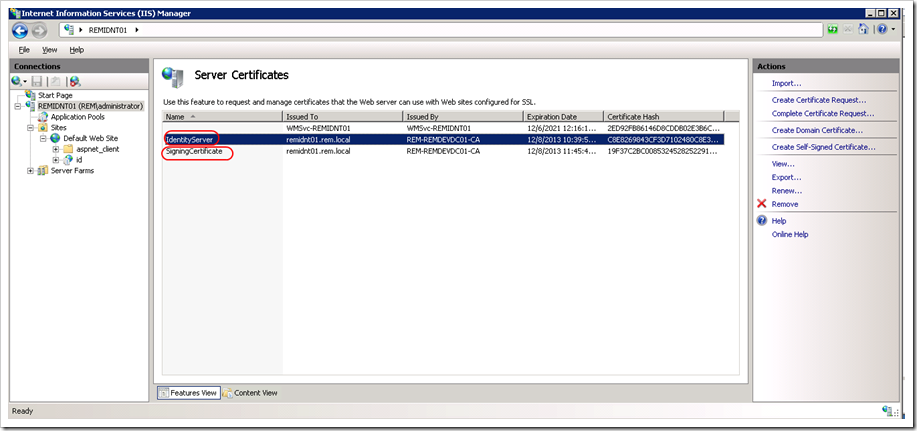
In my case, I have requested two certificates to the Domain Certificate Authority.
***UPDATE: Make sure the certificate Distinguished Name of each certificate is different (i.e.: Don’t request two certificates with the same attributes). I ran into an issue where IdentityServer’s x509Certificate Helper could not find the right certificate because there were two certificates, and it didn’t like that.
var certs = store.Certificates.Find(findType, value, false);
 if (certs.Count != 1)
 {
     throw new InvalidOperationException(String.Format("Certificate not found: {0}", value));
 }
We are almost there.
Configuring Identity Server
You should be able to navigate to Identity Server’s URL. If the certificates you created are not trusted by your computer, you see this screen. This occurs if you are using a certificate issued by a CA your computer does not trust.
Here is a link on how to trust the certificate.

You should be seeing Identity Server’s initial configuration screen. Go ahead and customize the first two fields to match your environment, and select the certificate that will be used for token signing.
UPDATE: Make sure that the IIS Worker Process Identity has access to the Private Key of your certificates. Use the Certificate MMC for this.

Tada!! You have successfully configured Identity Server and should be ready to add your application as a Relaying Party (RP). You can find a tutorial on how to do that over
here (scroll down to 2.Register an existing production STS).

).


